Friday, December 16, 2005

Free Convert PDF to Word, PDF to HTML or Text

How can I convert pdf to word? What is the best way extract Text from Adobe PDF documents and convert it into words ? I want to convert PDF to HTML for free online.

Option 1: Download Adobe Acrobat or other PDF conversion software, open your PDF document and choose save as Text. (Learn about some Adobe Acrobate Alternatives).

Option 2: Use GMail PDF conversion engine to convert doc, xls, ppt, rtf, pdf and OpenOffice documents to HTML. No software download is required.

Option 3: This is straight from Adobe, the developers of PDF. Adobe has developed these conversion tools as a free service to allow blind and visually impaired users to read Adobe PDF files.

You need to send the Adobe PDF as a MIME attachment in an e-mail message to Adobe:

* For conversion to plain text, e- mail the PDF file to pdf2txt@adobe.com
* For conversion to HTML, e-mail the file to pdf2html@adobe.com

All converted Adobe PDF documents will be sent back to the sender as MIME attachments.

This Adobe PDF conversion service provided work best on documents in English. Documents in European languages, such as French or German, should convert fairly well with the exception of symbols that can’t be represented by ASCII text, such as umlauts. Languages requiring double-byte characters, such as Japanese, Chinese, Arabic, and Hebrew are not supported. (Adobe may occasionally access the content you submit for purposes of quality control and administration of the conversion service.)

Option 4: Use the free Adobe Reader to save the PDF file as text, or use the full version of Adobe Acrobat Professional or Acrobat Standard to save the file to text or other formats, including Rich Text Format (RTF), HTML, XML.

Thursday, December 15, 2005

Microsoft products for future homes

Dan Simmons of BBC take us on a magical trip to future, as Microsft sees it. He looks at some amazing Technologies that Microsoft is hoping to bring to our homes in the next few years.

Post-It notes of the future - You can text or email your messages to a place rather than a person.

Photograph Collages - This Microsoft application automatically creates a tapestry from your favourite snaps. This software takes, fully automatically, a large collection of images, then takes the important bit from each image by doing optic recognition.This process will typically take a user about one hour with image editing software, or even longer to get great results. And this software does it fully automatically for you.

Personalized Facial Sketch Technology creates a caricature of any portrait snap. It identifies key parts of the face - like the edge of the lips or eyes - to automatically create a cartoon version. You can then use the results as emoticons for personalizing instant messaging or e-mail.

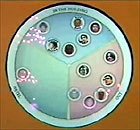
Interactive video and image bowl that reacts to touch - They take still images and video and be able to see them in the bowl and possibly also listen to music. Also, drag the images around the bowl making use of the physical properties of the bowl to be able to display things in certain places, and possibly let them sit at the bottom of the bowl for storage.

Microsoft Whereabouts Clock Those familiar with the Harry Potter books and films might recognize the first idea - it shows you where people are. Its inventor thinks its best use is in the home. This is more a new concept than a new technology, and the real version may still be a year or two away. It would track the mobile phone signals of loved ones, then cross-reference which mobile cell they were in with preprogrammed locations - like the home, school, or workplace.
Listen to Dan’s show Online in Media Player or Real Player. Read Microsoft Magic

Wednesday, December 14, 2005

Google Adsense Preview - Firefox Extension

The Google Adsense Preview Firefox extension brings the functionality of the Official Google Adsense Preview Tool in Firefox.
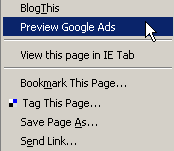
The Google AdSense preview extension will add a Preview Google Ads menu both to the Firefox toolbar and the right click popup menu. Clicking on Preview Google Ads menu item will open a new Firefox tab displaying a set of Google ads that may show on that web page where the Preview was requested.

Install Google Adsense Preview Tool 1.0

The Ads will be displayed in all official Google Ad formats. Both Text and Image Google Ads will be shown.

Firefox 1.5 and greater are supported. Javascript must be enabled in Firefox to use GoogleAdsPreview.

Visit GoogleAdsPreview on the Extensions Mirror website.

How to Test Google Safe Browsing Extension

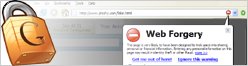
Google today released a Firefox plug-in that alerts users about possible phishing webpages.

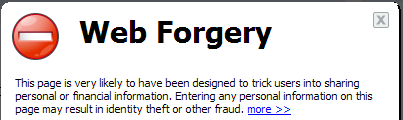
Open Google Safe Browsing Test Page phish-o-rama.html in Firefox Browser(1.5). If the Google Safe Browsing extension is installed successfully on your machine, you should see the “Web Forgery” alert when you load that page.

Google is blocking Non-US visitors from downloading the Anti-Phishing extension. You can however employ this Firefox hack to download and install the extension from any place on earth.

Convert PDF to HTML - Free Online Conversion

How to instantly convert Microsoft Office, OpenOffice, PDF documents to HTML without installing any third-party software like Adobe Acrobat or PDF2HTML. Extract Text from PDF documents. Convert doc, xls, ppt, rtf, pdf to HTML - Free Online Conversion that works on all platforms be it Windows PC, Mac or Linux.

We will utilize the recently announced See it now feature in GMail to convert Adobe PDF documents into html files. In addition to PDF, you can also convert all Microsoft Office Document formats (MS Word .doc, Excel .xls, Powerpoint .ppt, Rich Text Format .rtf), OpenOffice.org Document Formats (Writer, Calc, Impress, Presentation) and WML Files (Wireless markup language) to HTML. Here’s how to get this done with GMail:

1. Compose a new message in GMail. (If you are still without a GMail account, request a GMail Invitation code)

2. Attach any PDF or Word document that you want to convert to HTML You can attach multiple files in this step by clicking Attach another File.

3. Enter your own email address in the To: box and click send.

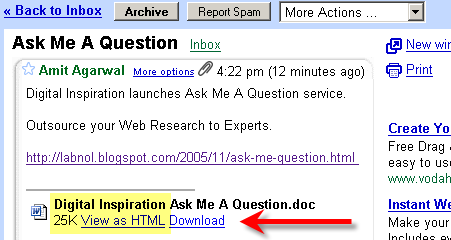
4. You instantly receive a message in your GMail Inbox folder. Open the message and click the “View as HTML” link next to your attachment.

5. The contents of your attachment appear as HTML in a new browser window without having to download the file. When you’re finished reading the attached file, close the new browser window to return to Gmail or Save the file to your harddrive.


GMail will show the following types of files as HTML: .pdf, .doc, .xls, .ppt, .rtf, .sxw, .sxc, .sxi, .sdw, .sdc, .sdd, and .wml. You can extend this trick to extract text from PDF documents (PDF to Txt) or Convert Adobe PDF documents to Word (PDF to Doc conversion). First convert the Document to HTML with Gmail and then open the HTML file in Microsoft Word and choose Save as .doc.

Convert PDF without Adobe Acrobat PDF writer - This has link to free or inexpensive PDF creation software. Or Read another Google approach to convert Microsoft Office and PDF files to HTML or Translate PDF and Office documents to different languages.

About GMail See it Now: You can view Microsoft Office, OpenOffice or .pdf attachments as a web page in HTML by clicking the “View as HTML” link right next to it. For when you’re on a mobile device or you don’t want to install some new software just to view a document. Or if you just want to see it faster.

If you are looking for a commercial PDF conversion software, we recommend ABBYY PDF Transformer that offers One-click conversion from PDF files to Word, Excel, HTML or text. It retains layout and format without retyping and reformatting.

Download Google Phishing Warning Extension Outside US

Google Safe Browsing is a Firefox plug-in developed by Google that alerts users about phishing websites. Google makes use of a blacklist containing pages that have been identified as suspicious and/or misleading based on automated detection or user reports. Google also examines pages’ content and structure in order to catch potentially misleading pages.

Google Safe Browsing for Firefox is only available for download for users located in the US. Visitors from other countries are blocked from downloading the Google Safe Browing firefox extension (google-safebrowsing.xpi) and instead, they are redirected to a page saying Download Not Available.

Here’s a short guide to download and install the Google Phishing Extension for Firefox users outsite the US.

1. Open this page in IE and choose Save.

2. Start Firefox and drag the google-safebrowsing.xpi onto the Firefox interface.

3. Restart Firefox.

Download link for US Visitors - Google Safe Browsing for Firefox


GMail, Google’s free email service, already has strong anti-phishing capabilities. Email messages suspected of being spoofed messages are labelled Spam and outbound links to fraudlent websites appearing in Phishing email messages are automatically disabled by GMail.

When you enable Enhanced Protection Feature, the URL of the site that you’re visiting will be sent to Google for evaluation. In addition, a very condensed version of the page’s content is sent to compare similarities between authentic and forged pages.

Tuesday, December 13, 2005

Adobe issues Pink Slips, Macromedia Logo Disappears

Adobe Systems Inc. will cut 650 to 700 jobs as it folds recently acquired rival Macromedia Inc. into its operations. Adobe had 4,286 employees at the end of the third quarter, while Macromedia had 1,538. The 11 per cent to 12 per cent workforce reduction would reduce overlapping positionsand employees from both companies would be affected.

Adobe Systems will record costs of as much as $US25 million ($33.3 million) to fire workers and close offices after its $US3.4 billion purchase of Macromedia. The expenses include as much as $US20 million in payments to sacked employees and $US5 million in fees to close offices, the company says in a filing it lodged last week with the US Securities and Exchange Commission.

Adobe will begin eliminating positions from the combined workforce. Layoffs will occur in jobs where there is duplication, says Pierre Van Beneden, Adobe’s vice president for Europe, the Middle East and Africa. Other workers in Europe may be offered jobs in Nordic regions or Eastern Europe to bolster product offerings there, he says.

Q.How is Adobe providing for employees who are not staying with the company?

A. Adobe is committed to making the transition for employees as smooth as possible. In the U.S., it is our intent to begin notifying all employees as soon as possible after the closing of the transaction. Detailed information on benefits will be provided directly to employees. Employees outside the U.S. will be advised on next steps by their managers. In order to assist employees with this career transition, Adobe has retained the services of Drake Beam Morin (DBM), a global outplacement provider.

Q. Adobe and Macromedia both have operations in several of the same cities and regions. Will there be facilities closures?

A. We have made key facilities decisions and will consolidate in a number of locations where duplication exists. As we work through the integration process, we will continue to evaluate where consolidating facilities may make sense, based on our hiring plans and the locations of our customers.


Following the Macromedia acquisition, Adobe India will hire additional 300 employees by the end of next year. Adobe India MD and print and classic publishing solutions business unit (PCPBU) senior VP Naresh Gupta informed this while announcing the completion of Macromedia Inc.’s acquisition by Adobe Systems Inc.

As a result of Macromedia acquisition, Adobe has acquired the Bangalore R&D center of Macromedia, which employed 146 engineers. Adobe’s staff strength in India had gone up to 650 from 504. Adobe’s India office is the largest for the company outside US. It accounts for 12% of Adobe’s employee strength and 25% of total engineering strength.

While the India centre will continue to provide support and upgrades for Adobe’s product lines in general, it will develop and own print, multimedia and e-learning tools like PostScript, Type, FrameMaker, PageMaker, Macromedia Captivate (formerly eHelp Robodemo), Authorware, Contribute, JRUN, among others.